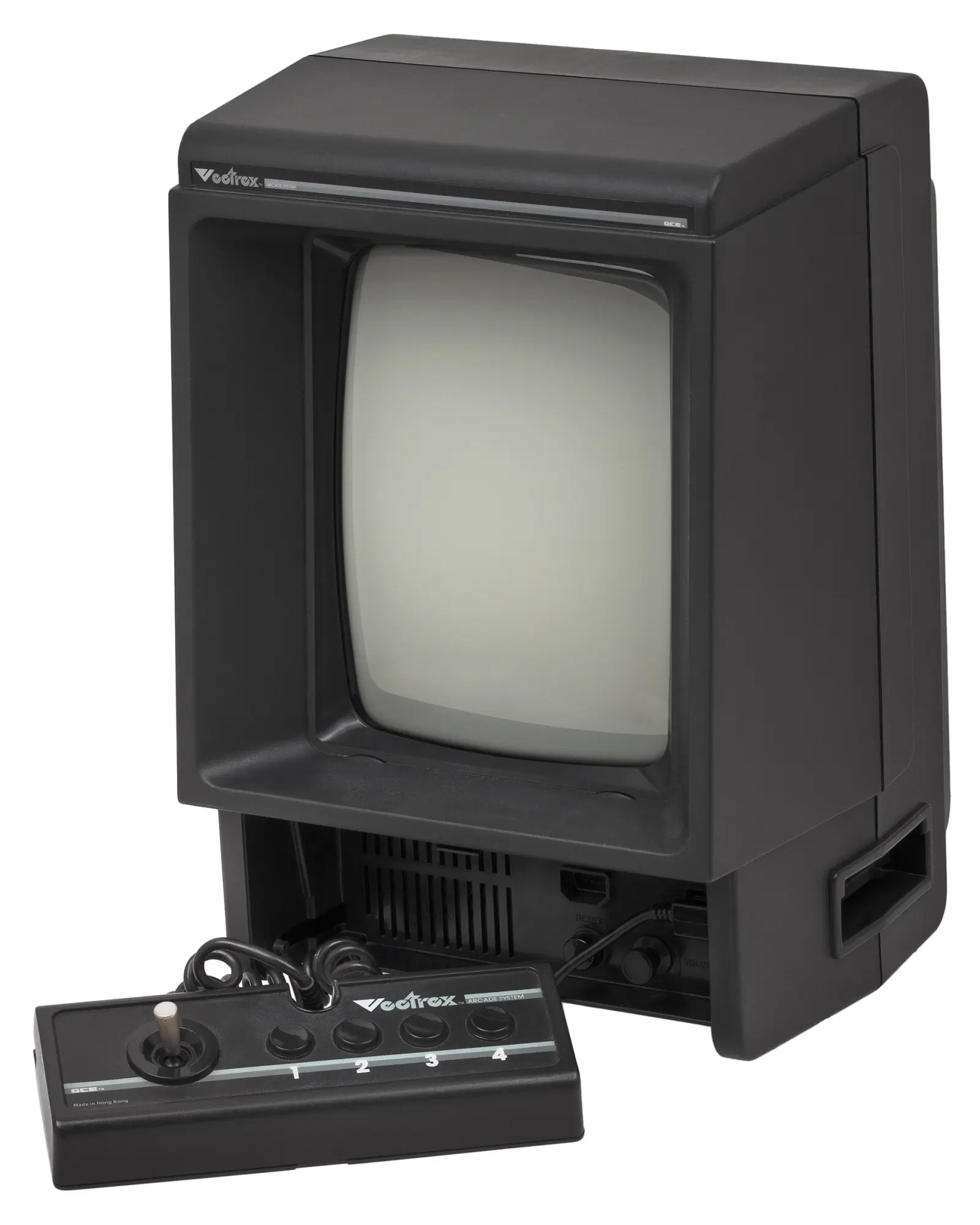
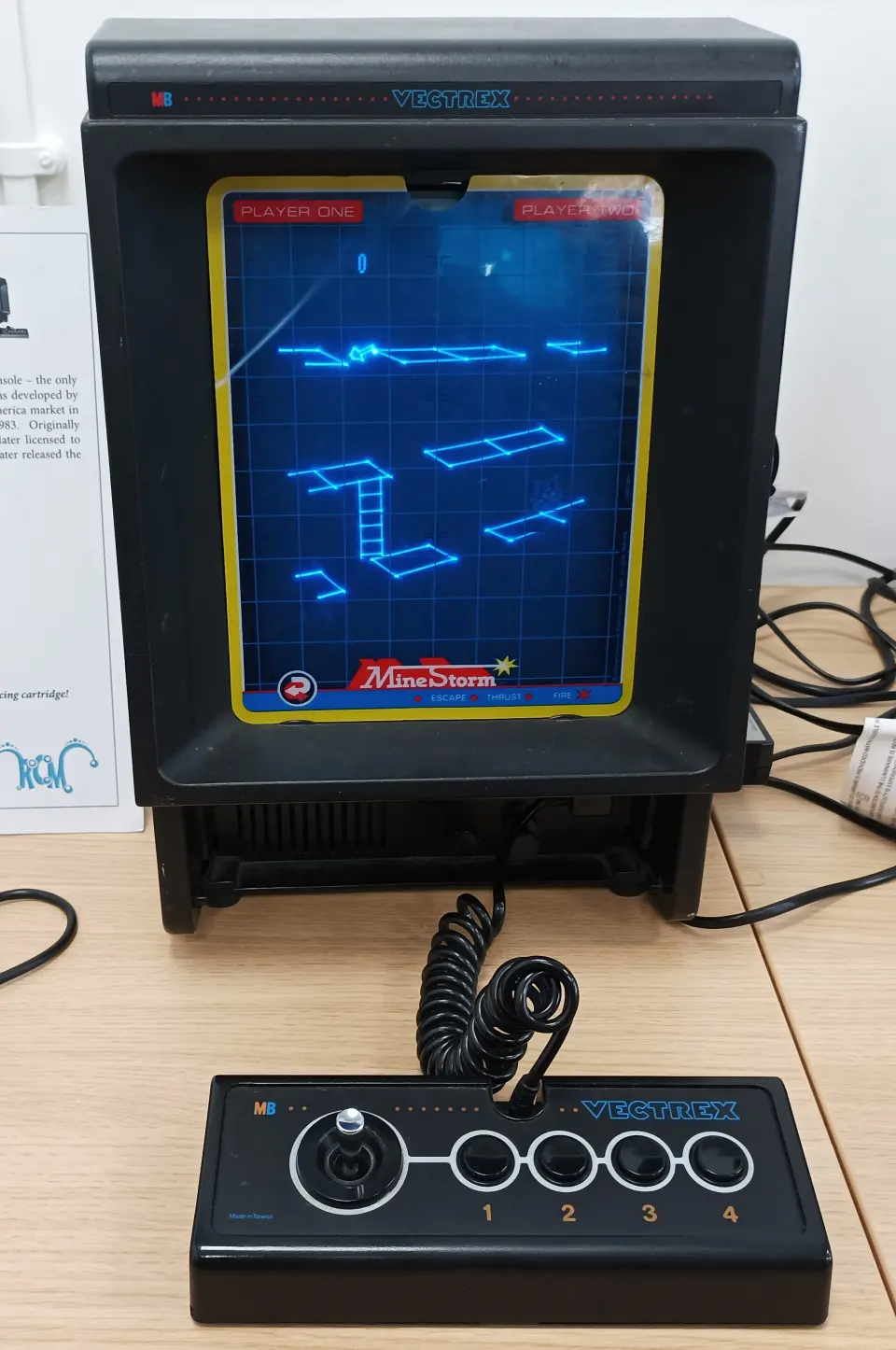
In 1982, Vectrex brought its own screen into the living room: a portrait CRT that drew bright lines instead of connecting to the family television. Its appearance recalled vector arcade machines, but it was a self-contained home system with a detachable controller and cartridge games. That combination made it distinctive—and difficult to fit into the console market of its time.
From Mini Arcade to Vectrex
The project began at Smith Engineering/Western Technologies as an idea for a compact home machine using vector graphics. Jay Smith III led the effort; Mike Purvis and John Ross were involved in the original concept, and Ross played a central role in the hardware design. Development began under the name “Mini Arcade,” passed through other working names and became Vectrex when General Consumer Electronics (GCE) took on its commercialisation.
The system was introduced in 1982 and reached US shops that year. GCE’s transition to Milton Bradley expanded overseas distribution. MB-branded systems reached Europe during 1983, while Bandai marketed the Japanese version. This expansion coincided with a period of sharp contraction in the video game market: production ended in 1984.
Vectrex was not a pocket handheld. Its built-in screen spared the household television, but the unit’s weight and mains power limited its mobility. The controller could be detached and stored below the screen. It had a two-axis analogue joystick and four buttons; each game determined how those controls worked.
A drawn image, not a field of pixels
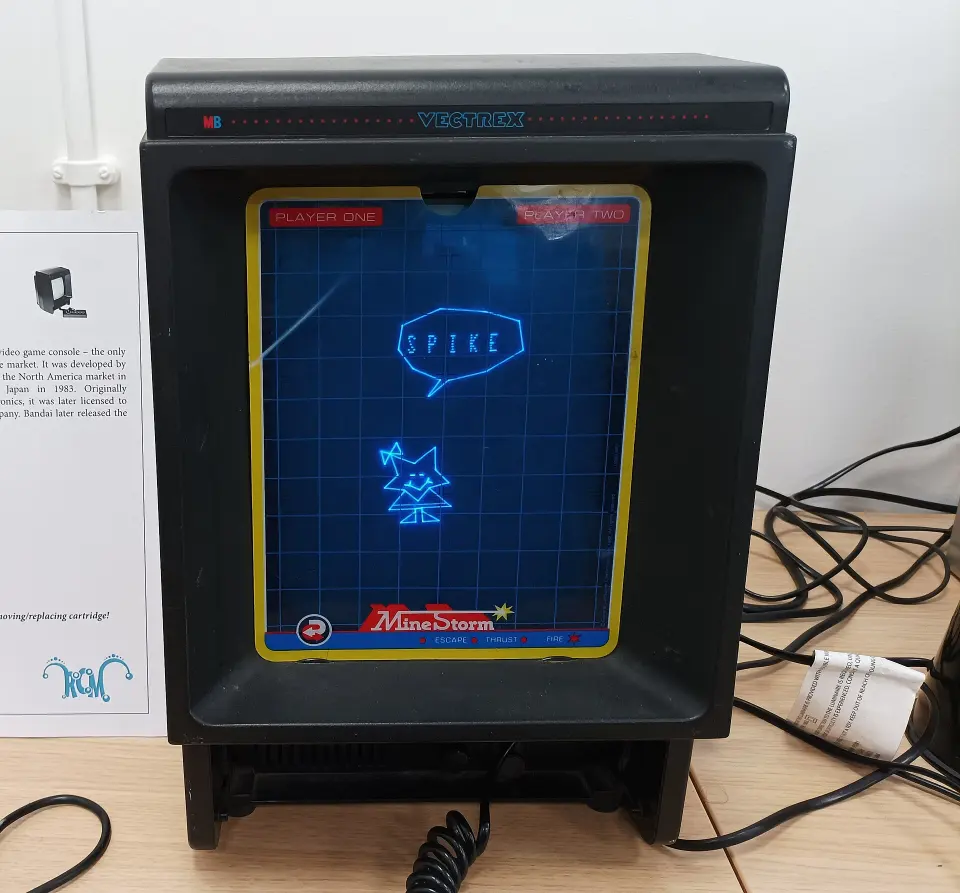
In a conventional raster CRT, the beam scans successive lines to form an image. Vectrex used a monochrome CRT whose beam traced segments between points. This method gave outlines a crisp appearance and made rotation and scaling natural effects. It also imposed limits: drawing time and scene complexity constrained what could appear on screen.
The monitor measured about nine inches. Rather than replace it with a colour tube, games could add colour using a transparent sheet, or overlay, placed in front of the glass. Overlays supplied fixed colour bands, frames, scenery and instructions. They did not let each line choose its own colour: the image drawn by the tube remained monochrome.
The solution had both a graphic and a practical role. An overlay could define the playfield and explain controls as well as change the look of a simple display. That is why overlays are part of each game’s design, not merely a substitute for a colour screen.
Games made for the portrait display
Mine Storm was built into the system, so it could be played without a cartridge. Its ship faced mines and other hazards in a line-graphics game close to the asteroid-shooting tradition. The cartridge catalogue mixed arcade conversions with original titles. Scramble brought over its side-scrolling route; Berzerk its mazes and robots; Armor Attack, Star Castle and Rip-Off explored different arrangements of combat and movement.
The portrait display and joystick response shaped the experience along with the graphics. Games did not all use the analogue controller in the same way, and each program’s rules mattered as much as the screen technology. Cosmic Chasm, created for Vectrex, also reached arcade machines—a less common journey that illustrates the exchange between home systems and arcades.
Accessories that changed how players saw and drew
The 3D Imager was one of the system’s most striking accessories. A spinning disc with opaque areas and colour filters synchronised with images drawn for each eye. Compatible games could create colour and a sense of depth, even though the console’s CRT remained monochrome. Titles designed for the accessory included 3D Mine Storm, 3D Narrow Escape and 3D Crazy Coaster. It was a mechanical optical system, different from modern LCD glasses and virtual-reality equipment.
The Light Pen offered another kind of interaction: it sensed light from the CRT and let compatible software interpret a position on the screen. Art Master focused on drawing, AnimAction on animation and Melody Master on music. The pen laid down no ink and did not turn every game into a drawing application; its use depended on software designed for it.
The end of sales, and what followed
Its date and interchangeable-cartridge catalogue place Vectrex within the second generation of consoles, alongside the landscape of Atari 2600, Intellivision and ColecoVision. Its own display set it apart, but it shared the need for appealing software and distribution that reached households. The 1983 crash was particularly severe in the North American console business; it did not describe an identical course in every country or every form of gaming.
Vectrex faced the same distribution and consumer-confidence problems that affected the video game industry during the 1983 crash, particularly in North America. Milton Bradley stopped production in 1984. That was the end of its commercial run, not the end of video games or of interest in vector graphics.
Decades later, enthusiasts and independent developers continued to create games, tools and documentation. Malban’s Vectorblade keeps source code and resources in a public repository; the Vide environment is used to develop Vectrex software. Vecx lets users run and study its programs through emulation on other computers. Emulation makes the system more accessible, but a pixel display cannot reproduce exactly the glow, phosphor persistence or physical presence of a vector CRT.
Preservation also involves manuals, software versions, source code and provenance. The availability of a file does not mean that every work or resource has the same terms of use; the conditions attached to each project matter.
Caring for a unit and finding it in collections
For a console that has been stored for a long time, it is prudent to check the outside of the casing and power cable, keep ventilation clear and choose a dry, cool place away from direct sunlight. With the console unplugged, clean the screen and overlays gently, without abrasives or solvents; store the sheets flat to avoid folds and scuffs. Do not turn brightness to its maximum to compensate for a faulty image.
A background buzz has been observed in many units. By itself, that sound cannot establish whether a machine is faulty or confirm that it is in good condition. Marked changes, crackling, an unusual smell or a collapsing picture are reasons to switch it off and consult a technician. CRT components can retain dangerous charge even when unplugged, so external care should not be confused with an invitation to open or modify the machine.
Vectrex appears in collections including those of the Computer History Museum and the Museum of the Moving Image; the latter says its example is not currently on view. The Strong in Rochester includes the system among those presented in Console Central, while the HomeComputerMuseum in Helmond describes an interactively set-up example in its catalogue. A collection record does not guarantee that a console is on display or available to play: check with the museum before planning a visit.
Vectrex remains distinctive because it did not try to imitate a home television. It made the screen inseparable from the console and brought into the home a drawing technique associated with vector machines. Its overlays, accessories and games show how a technical constraint could also become a visual and playful identity.
Documentary gallery
- Decade
- 1980s
- Region
- Global
- Level
- Enthusiast
- Entities
- Museum, Atari 2600, Cuatro, Atari
Sources and references 15
- The Strong · The Vectrex Turns 30www.museumofplay.org · 2026-11-12
- The Strong · Console Central exhibitionwww.museumofplay.org · 2026-11-12
- Computer History Museum · Vectrex Game Consolewww.computerhistory.org · 2026-11-12
- HomeComputerMuseum · Vectrexwww.homecomputermuseum.nl · 2026-11-12
- Vectrex Museum · console and controlswww.vectrexmuseum.com · 2026-11-12
- Vectrex Museum · historywww.vectrexmuseum.com · 2026-11-12
- Vectrex Museum · game cataloguewww.vectrexmuseum.com · 2026-11-12
- Vectrex Museum · 3D Imagerwww.vectrexmuseum.com · 2026-11-12
- Vectrex Museum · Light Penwww.vectrexmuseum.com · 2026-11-12
- Vectrex FAQ · historical community documentationwww.digitpress.com · 2026-11-12
- Vectrex · technical manual transcriptionwww.playntradeonline.com · 2026-11-12
- Museum of the Moving Image · Vectrex collection recordmovingimage.org · 2026-11-12
- Goethe University collections · Vectrexsammlungen.uni-frankfurt.de · 2026-11-12
- Vectorblade · developer source repositorygithub.com · 2026-11-12
- Vecx · emulator source repositorygithub.com · 2026-11-12