Touchscreen accuracy depends on more than how many points a sensor can detect. It also depends on how those readings map to the image, what feedback people receive while touching the screen, and when an action is committed. From the 1970s through the 1990s, engineers and researchers addressed these questions with infrared grids, cursor-stabilisation algorithms and selection strategies that let users correct their aim before confirming.
A grid around the display
Touch-input research was already underway in the 1960s, as Bill Buxton recounts in his history of these interfaces. Touch input appeared in classrooms and terminals before it became a familiar feature of personal computers. In 1972, the PLATO IV educational system used an infrared matrix around the display surface. A patent by Frederick Ebeling, Roger Johnson and Richard Goldhor describes crossed beams: when a finger interrupted one horizontal and one vertical beam, the system could send the corresponding addresses to a computer.
The patent’s example offered 16 positions per axis, or 256 addressable positions. These were touch-input locations, not the resolution of the displayed image. For that application, the authors considered two positions per inch sufficient. The design scanned its emitters and detectors in sequence without requiring complex optical collimation.
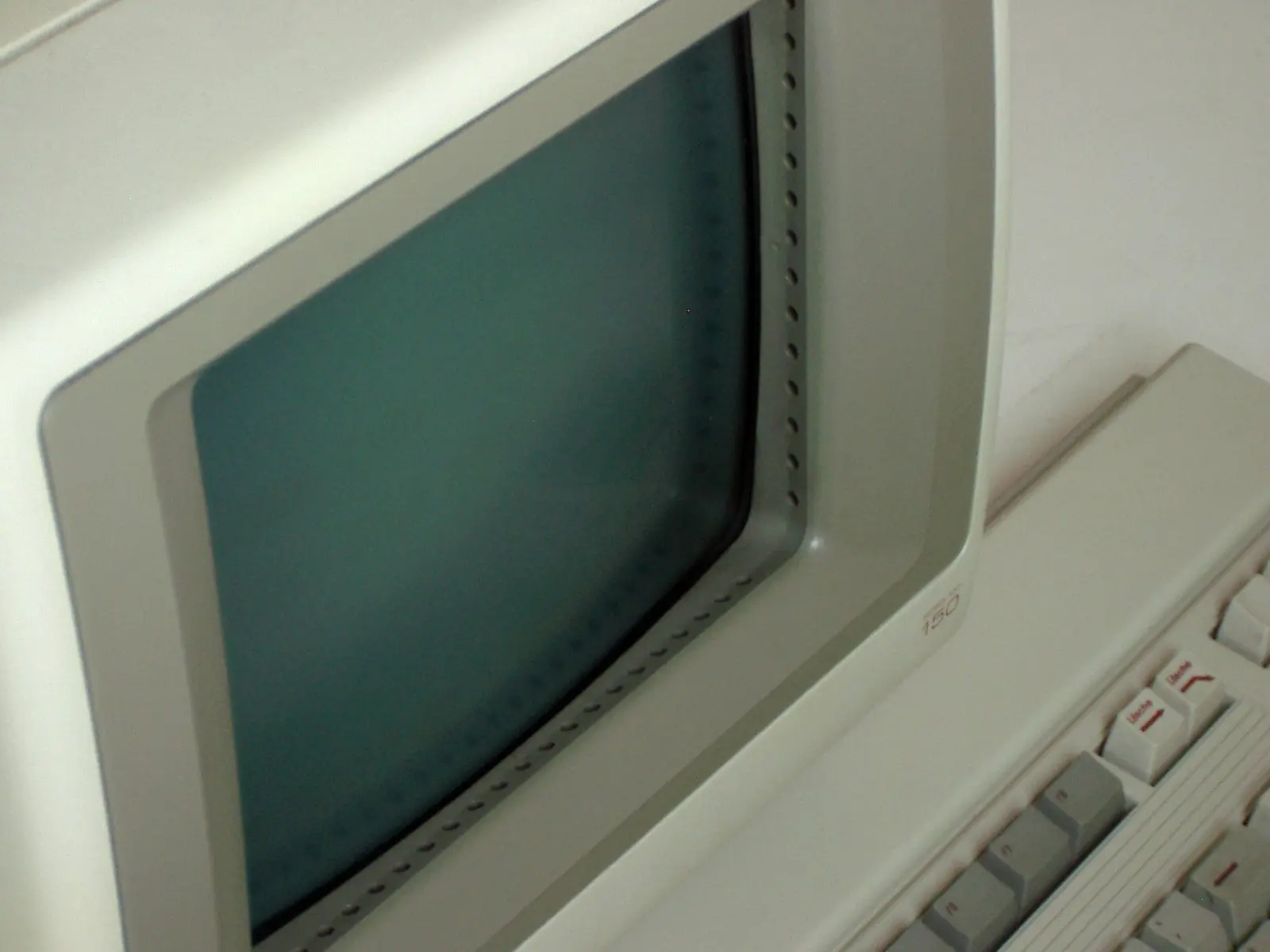
Introduced in 1983, the HP 150 brought another infrared array to a personal computer. Its designers described the system in the August 1984 issue of Hewlett-Packard Journal. Infrared-emitting diodes and phototransistors mounted along the edges detected which light paths an object had blocked. The computer scanned these pairs and calculated a position from the groups of interrupted beams.
The algorithm accepted one contiguous group of interruptions on each axis. The centre of each group supplied the coordinate: if an even number of beams was blocked, the calculation could place it between two pairs. This produced an effective resolution of 41 columns by 27 rows, nearly twice the number of available pairs in each direction. The processor then mapped those coordinates to the display; for example, it translated columns into character coordinates.
Physical detection and a program’s response were separate layers. The HP 150 firmware allowed programs to define rectangular touch fields so that any contact within a field triggered the same operation. It could also provide visual or audio feedback and distinguish an initial touch, a change in position and the lifting of a finger. An interface could therefore make selection more forgiving without changing the sensor grid.
Different sensors, different problems
The HP 150 designers chose infrared after considering other techniques. Resistive and capacitive films could measure electrical changes associated with contact, but added a layer over the image; the article noted possible degradation in display quality and limited film lifetime. Ultrasonic systems could locate contact through changes in sound transmission or reflection, but could be expensive and sensitive to dust. Pressure transducers at the display’s corners required an appropriate mechanical mounting.
There was no universally superior technology: each involved trade-offs in resolution, cost, transparency, durability and response. Nor did all sensors provide the same kind of information. Some registered only the initial contact; others returned successive positions as a finger moved. That difference shaped which interaction strategies could be built on top of them.
Three ways to make a selection
In a study published at CHI in 1988, Richard Potter, Linda Weldon and Ben Shneiderman compared three strategies using a MicroTouch screen that returned a stream of positions. The task was to find state abbreviations in a grid of small, closely spaced targets.
- Land-on committed the initial position. If the finger landed outside a target, later movement did not change the selection.
- First-contact selected the first target the finger touched while sliding. It could recover from a miss into empty space, but might activate an unwanted option along the way.
- Take-off, also called lift-off selection, displayed a cursor offset above the finger. Users could drag it, see a target highlighted and confirm by lifting their finger.
In that experiment, take-off reduced errors but was slower than first-contact: mean selection time was 20.92 seconds, compared with 16.93 seconds. That difference belongs to that task, those targets and that implementation; it is not a rule for every touchscreen. The authors noted that a more elaborate strategy might not be worthwhile for a screen with only a few large buttons. These times included finding the target and completing the correct selection; they did not measure the sensor’s electronic latency alone.
The study distinguished two kinds of error: selecting the wrong target and touching a blank area. First-contact, for example, could correct the second while making the first more likely if the finger crossed an unintended option. Being able to review a selection before confirming it offered a practical advantage in dense interfaces, but took time and made clear visual feedback important.
Stabilising the cursor without too much delay
Research by Andrew Sears and Ben Shneiderman examined whether software stabilisation could make small targets easier to select. Sears and Shneiderman’s report is dated January 1989; the paper appeared in 1991. The two dates therefore refer to different stages in the work’s circulation and publication.
In their experiment, a 640 × 350-pixel EGA display was paired with a capacitive sensor that reported positions on a 1024 × 1024 grid. The display and sensor did not share the same resolution: software translated the sensor coordinates into pixels. The device calculated the centroid of simultaneous contacts rather than tracking each finger independently.
Sears and Shneiderman recorded time and errors per target. Lifting a finger without a successful selection counted as an error; reaching the attempt limit advanced the task to the next target. An error count per target is not the same as the percentage of people unable to complete the task.
An unstabilised cursor could jitter even when a person tried to hold a finger still. A running average reduced the movement but made the cursor lag behind. The researchers tried a region-based approach: a small area in which the cursor stayed still, a larger area in which it moved only part of the distance, and an outer area where it jumped directly to the finger’s position. The aim was to balance stability and responsiveness, not to apply one uniform filter.
With lift-off selection, an offset cursor and stabilisation, participants could select 4 × 4-pixel targets, about 1.7 × 2.2 mm on that display. In the final comparison, the stabilised touchscreen and mouse showed no statistically significant difference in time or errors for targets four pixels per side; for single-pixel targets, the mouse was faster and more accurate. Selecting one pixel in a controlled test does not make that size a design recommendation or guarantee equivalent everyday performance.
Experience also changed the results. In the study, some participants discovered that rolling a finger near a target allowed fine adjustments. The researchers observed fewer errors among those who used this method, but data from one experienced user were presented as an illustration, not as a statistical comparison equivalent to the group results.
Physical size and posture matter
A pixel count alone does not say how easy a key is to touch. In a study of touchscreen keyboards by Sears and colleagues, published in 1993 from a 1992 report, four keyboard sizes were compared using lift-off selection. Novices typed more slowly on smaller keyboards; experienced users achieved higher speeds at every size. Size and practice both influenced performance.
Target size and movement distance also relate to selection time. Sears and Shneiderman explored a modification of Fitts’ law that separated the finger’s initial approach from adjustment on the surface, but their data did not conclusively validate the proposal. It was not a universal formula for touchscreen accuracy.
The researchers also mounted the monitor at about 30 degrees to the desk, drawing on earlier work on posture and fatigue. That detail is a reminder that selection does not happen on an abstract plane: the physical dimensions of keys, the screen’s orientation and the effort of holding an arm out all matter. A cursor may represent a coordinate precisely without making the task comfortable over a long session.
Nor are resolution, accuracy and repeatability interchangeable. Resolution describes the positions a device can report; accuracy, how closely those positions correspond to a reference point; repeatability, how much comparable touches vary. A fine grid does not by itself guarantee alignment or a stable cursor. Calibration corrects a systematic offset in the mapping, while jitter or variable noise calls for different methods.
Other difficulties include parallax, when the contact surface and the image do not appear aligned from the viewing angle, and occlusion, when a finger covers a target or cursor. The contact point can also shift as a finger lifts: in Sears and Shneiderman’s experiments, participants sometimes moved the cursor just before losing contact. These are distinct problems with different consequences for selection.
More than pressing a button
Lee, Buxton and Smith’s 1985 research broadened the problem from precise single-point input to the detection of multiple contacts. Their prototype was a touch tablet, not a transparent display. It sensed several points simultaneously and measured the degree of contact at each; a sensor grid and a recursive subdivision algorithm helped locate the touched areas. The authors explored how these capabilities could expand the vocabulary of interaction, for example in simultaneous controls or musical instruments.
In the following years, work at the University of Maryland’s HCIL applied touchscreens to museum kiosks, home-automation systems, drawing tools and keyboards. Context mattered: a public kiosk could benefit from visible targets and immediate correction, while a compact keyboard had to balance available space, speed, errors and practice.
The history of touchscreen accuracy is not simply a story of increasingly fine sensors. It is also a story of systems that separated detecting contact from interpreting intention. The grid provides a position; software maps it; the interface shows what will happen; and the selection strategy decides when to act. Careful design at each step could reduce errors and broaden the technology’s uses, though no technique removed every limit imposed by the screen, the device or the body interacting with it.
- Decade
- 1980s
- Region
- Global
- Level
- Enthusiast
- Entities
- Museum, Cuatro, Ordenadores personales
Sources and references 9
- Bill Buxton — A Touching Story: A Personal Perspective on the History of Touch Interfaces Past and Future (SID, 2010)www.billbuxton.com · 2026-11-12
- Ebeling, Johnson y Goldhor — Infrared light beam x-y position encoder for display devices, US3775560 (1973)patentimages.storage.googleapis.com · 2026-11-12
- Straton, McClelland y Kilbourn — The HP 150 Touchscreen: An Interactive User Input Device for a Personal Computer, HP Journal (agosto 1984), pp. 11–14vtda.org · 2026-11-12
- Potter, Weldon y Shneiderman — Improving the Accuracy of Touch Screens: An Experimental Evaluation of Three Strategies (CHI 1988)www.cs.umd.edu · 2026-11-12
- Sears y Shneiderman — High Precision Touchscreens: Design Strategies and Comparisons with a Mouse (versión 1989; publicación 1991)www.cs.umd.edu · 2026-11-12
- Lee, Buxton y Smith — A Multi-Touch Three Dimensional Touch-Sensitive Tablet (CHI 1985)www.billbuxton.com · 2026-11-12
- Sears, Revis, Swatski, Crittenden y Shneiderman — Investigating Touchscreen Typing: The Effect of Keyboard Size on Typing Speed (informe 1992; publicación 1993)www.cs.umd.edu · 2026-11-12
- Hewlett-Packard Company Archives — The HP 150: The Magic Monitorwww.hewlettpackardhistory.com · 2026-11-12
- HCIL, University of Maryland — High-Precision Touchscreens, 1988–1991 Researchwww.cs.umd.edu · 2026-11-12